DeepBlocker comes as two packages, because browsers now run two different kinds of extension. Choose your browser to see which one to use.
Manifest V2
Legacy compatibility
Stable
The complete DeepBlocker engine. It checks every request as a page loads, with 71 filter lists, three protection modes and the blocked page.
Runs in
Microsoft Edge156 for Windows, verified 1 November 2026
Microsoft is phasing out Manifest V2 extensions in Edge: some users see warnings since mid-September 2026, and deprecation for businesses is expected from early 2027. Support can end.
For browsers that run only Manifest V3 extensions, such as Google Chrome. Built from the same filter lists, with the browser doing the filtering.
Being tested in
Google Chrome156 for Windows, with Chrome for Testing
Microsoft Edge156 for Windows
Not available to download yet. It will be offered here once it passes its release checks, with its own install steps.
Working in tests
Network blocking with the 16 default filter lists, malware and phishing protection, hiding page elements, page scripts, the blocked page, and turning DeepBlocker off for a site.
Needed before it is offered
Filter list updates between versions, so that its malware and phishing protection stays current.
Not in this package
Protection modes and the 55 optional filter lists.
Browser support
Last verified 1 November 2026
Browser
Package
Status
Notes
Microsoft Edge
Manifest V2
Verified
Version 156 for Windows. Microsoft is phasing out Manifest V2 extensions, so this can end.
Microsoft Edge
Manifest V3
In testing
Version 156 for Windows. Not released yet.
Google Chrome
Manifest V3
In testing
Version 156 for Windows, tested with Chrome for Testing. Not released yet.
Google Chrome
Manifest V2
Not supported
Chrome 139 and later no longer runs Manifest V2 extensions.
Brave, Opera, Vivaldi
—
Not verified
Neither package has been tested in these browsers.
Firefox
—
Not supported
Neither package is built for Firefox.
Safari
—
Not supported
Neither package is built for Safari.
Browsers change what extensions may do, so support is checked again for every release, in real browsers and against Microsoft's and Google's current guidance. DeepBlocker is not in any browser's extension store: it is installed from this page.
Install in Microsoft Edge
The Manifest V2 package installs from a folder, through Edge's Developer mode. It takes about a minute, and no store account is involved.
Download
Get DeepBlocker_2.0.0_MV2.zip above and save it somewhere you can find again.
Extract
Unzip it into a folder you will keep: Edge loads DeepBlocker from there.
Developer mode
Open edge://extensions and turn on Developer mode.
Load unpacked
Choose Load unpacked and select the folder you extracted.
Updating? Extract the new version into the same folder as your current DeepBlocker, replacing its files, then press Reload on edge://extensions. Your settings stay. A copy loaded from a different folder is a separate extension with default settings.
More detail, including how to check the download, is in the installation guide.
Everything you need. Nothing you don't.
One quiet interface, sensible defaults, and protection that works from the moment you load it.
Ads
Banners, interstitials and video ads are blocked as the page loads.
Trackers
Blocks the analytics and tracking requests that follow you from site to site.
Cookie banners
Hides consent pop-ups on the many sites the filter lists already cover.
Three modes
Standard, Strong or Ultra. Pick once; change it whenever a site needs more slack.
Local by design
Filtering, settings and counters live in your browser. Nothing about your browsing is sent anywhere.
Current filters
Community filter lists refresh in the background, so new trackers are covered as the lists add them.
As in the Manifest V2 package. The Manifest V3 package, in development, has no protection modes, and its lists do not update between versions yet.
Designed to feel calm
The popup for a quick answer, a small dashboard for everything else. One dark interface throughout.
PopupWhat was blocked here, and one switch to turn protection off for this site.
SettingsChoose a protection mode and a handful of options.
Filter listsSee what is enabled, how current it is, and update everything in one click.
DiagnosticsA plain answer to “is it actually working?”
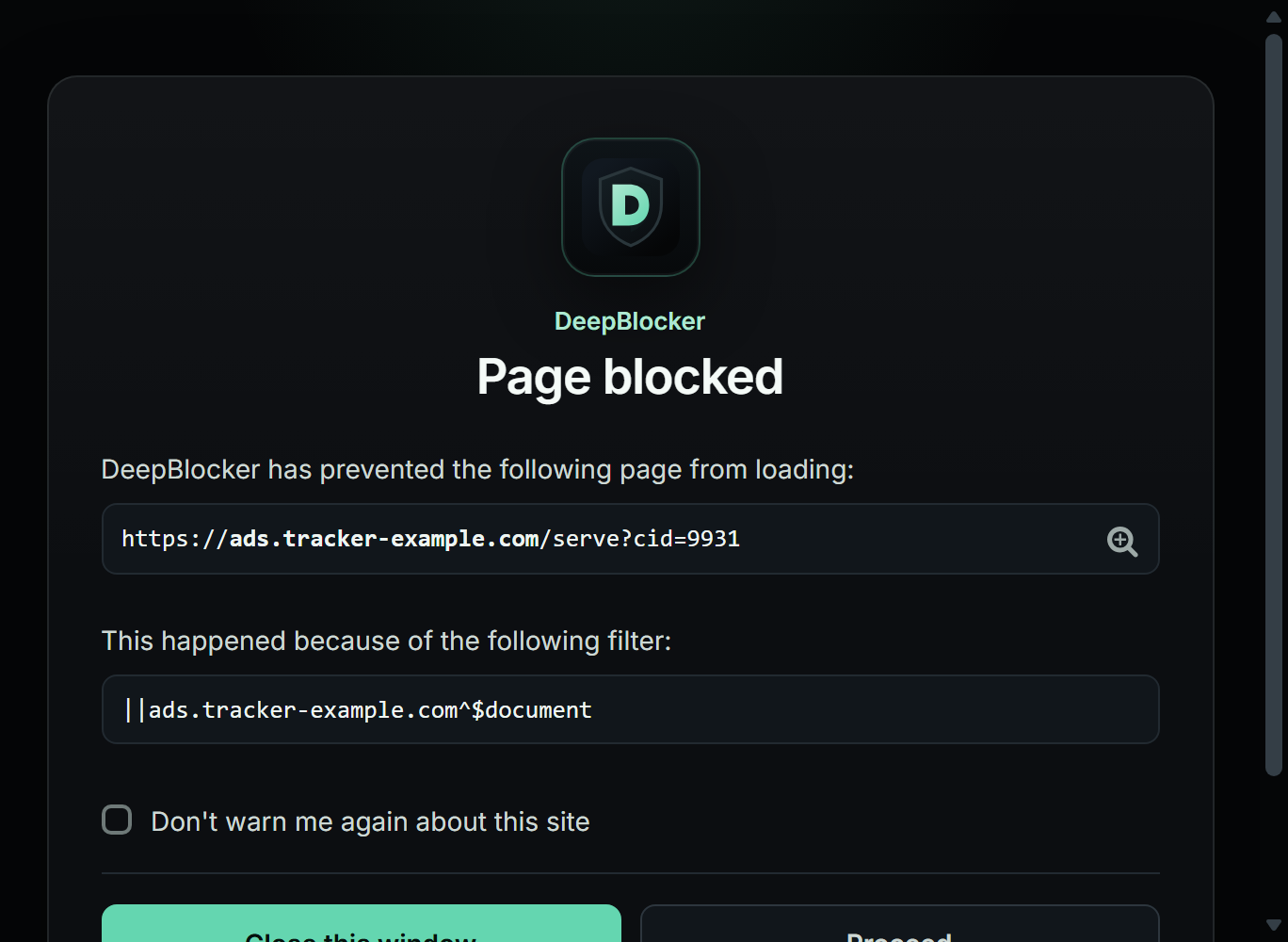
Blocked pageShown when a whole page is blocked, with the filter responsible — you decide whether to continue. The address and filter are an example.
Every screenshot on this site is a real capture of the Manifest V2 package running in Microsoft Edge, with real filter lists and real counts: cropped to fit, never mocked up or retouched. The screens shown have not changed in version 2.0.0.
Privacy isn't a feature. It's the default.
DeepBlocker has no servers and no backend. Your protection mode, your lists and your counters are stored by your browser and never leave it. The only requests it makes are to download filter list updates.
Pick by browser. In Microsoft Edge, use the Manifest V2 package, version 2.0.0, verified on Edge 156 for Windows. Google Chrome runs only Manifest V3 extensions, and DeepBlocker's Manifest V3 package is in development, so there is nothing to install in Chrome yet. Other browsers have not been verified: the browser support table has the detail.
What do Manifest V2 and Manifest V3 mean?
They are the two kinds of extension that Chromium-based browsers run. With Manifest V2, DeepBlocker checks every request itself as a page loads. With Manifest V3, the browser does the filtering, from rules that ship inside the extension: that limits what can be filtered, and the filter lists change only when the package does. Chrome now runs only Manifest V3 extensions, and Microsoft is phasing out Manifest V2 in Edge.
How do I update without losing my settings?
Extract the new version into the same folder as your current DeepBlocker, replacing its files, then press Reload on the browser's extensions page. Your settings stay. A copy loaded from a different folder is a separate extension, with default settings. Updating in the documentation has the steps.
What are the limitations?
The Manifest V2 package runs only where browsers still allow Manifest V2 extensions, and Microsoft is phasing them out in Edge. The Manifest V3 package, in development, has no protection modes and only the 16 default filter lists, and its lists cannot update between versions yet: it will not be offered until they can. Neither package is in a browser's extension store, so new versions are installed by hand.
Does DeepBlocker collect any data?
No. There is no telemetry, no analytics and no account. Your settings and counters stay in your browser. The only requests DeepBlocker makes are to download filter list updates. The privacy policy has the detail.
Where do I report a problem?
Message misakisakura3 on Discord. Say which page, which browser and version, and which package you use; DeepBlocker's Diagnostics page shows the details that help most.
Is DeepBlocker free?
Yes. There are no paid tiers, no subscriptions and nothing to buy.
Is DeepBlocker in a browser's extension store?
No. DeepBlocker is installed from the download on this site, so no store account is involved.
What if a website stops working?
Switch to a less strict protection mode, update your filter lists, then reload the page. You can also turn DeepBlocker off for just that site from the popup. Troubleshooting walks through it.
Can I turn DeepBlocker off for one site?
Yes. Open the popup on that site and press the large power button. DeepBlocker stays off for that site, and only that site, until you press it again.
DeepBlocker now comes as two packages. This is the Manifest V2 package, for browsers that still run Manifest V2 extensions, such as Microsoft Edge. Google Chrome no longer runs them.
About shows which package is installed, next to the version.
A Manifest V3 package for current Chromium browsers is in development. It is not released yet.
No changes to blocking, the filter lists or the protection modes.
1.4.5
About now links to Legal & licenses: the copyright and licence notices for DeepBlocker, the project it is built on and the libraries it bundles, and the authors of every filter list.
Filter lists written by others keep their authors’ names: the AdGuard and EasyList cookie-notice groups and the official Polish list no longer appear under the DeepBlocker name.
Settings no longer draws an empty outline next to “Protection mode”.
No changes to blocking, the filter lists or the protection modes.
1.4.4
A cleaner, more consistent interface across the popup, dashboard, welcome and blocked pages.
The popup's power button now works from the keyboard, and pages DeepBlocker does not filter — the new tab page, for example — say so instead of showing an internal name.
Settings, Filter lists and Diagnostics are easier to read, their list counts agree, and a healthy installation no longer shows a warning.
Fixed a rare case where, after the browser restarted, some site rules could stop matching or filtering could stall.
1.4.3
Protection against pages that try to slip a harmful command onto your clipboard, such as fake “verify you are human” prompts, now works: the copy is stopped and a warning shows the command.
Pages on a shared hosting domain, or on localhost, no longer sometimes treat separate sites under that domain as the same site, which could let third-party filters miss them.
Filters that apply only to certain pages of a site now follow web apps that change the address without reloading.
Malformed filter rules with an unfinished site pattern are rejected instead of being applied in a garbled form.
1.4.2
Fixed a site-wide header exception silently switching off the security-policy protection that other filters add to pages.
Page scripts that filters restrict to part of a site, or to frames embedded by a specific site, now run on the right page or frame instead of whichever one was opened first.
Filter lists are rebuilt once after updating.
1.4.1
A filter list is no longer replaced when its server answers with an error message instead of the list, so protection is kept until a valid update arrives.
Fixed a request occasionally being matched against outdated filter data right after filter lists were reloaded, which could let tracking parameters through.
Fixed the support page failing to finish loading, which left its buttons unresponsive.
1.4.0
Fixed the popup shaking or flickering when opened from the toolbar.
Hardened filter compilation so an exception rule that excludes a site can no longer become an active rule.
1.3.0
More reliable blocking on sites that replace the page's event-listener handling.
Removed redundant page instrumentation, so protection touches each page more lightly.
Fixed a filter-list group heading that displayed incorrect text.
Showing the latest 8 releases. The full history ships inside DeepBlocker, on the About page.
 DeepBlocker